Learn the powerful enterprise adaptable database:

Getting Started With ADABAS & Natural

Showing posts with label ionic1. Show all posts

Monday, January 1, 2018

101 ionic1 firebase login


.

ionic1 firebase login


note:

  1. create firebase account at https://console.firebase.google.com
  2. create a project e.g. notaraziproject
  3. go to authentication section, select sign-in method = email. add your authorised domain (the domain that you will use to run login scripts and communicate with the firebase server)
  4. in authentication section, click web setup to get your [firebase web config codes]
  5. copy the source codes below, replace with your [firebase web config codes]


codes:

See the Pen 101 ionic1 firebase login by notarazi (@notarazi) on CodePen.

Friday, June 2, 2017

201 Ionic1 ng show hide elements


.

201 Ionic1 ng show hide elements

1) Begin with Startup Codes

2) Add basic VIEW and CONTROL codes

<html>
<head>
<meta charset="utf-8">
<meta  name="viewport" content="initial-scale=1,maximum-scale=1,user-scalable=no,width=device-width">
<title></title>
<!--local lib-->
<!--<script src="lib/ionic/js/ionic.bundle.js"></script>-->
<!--cloud lib-->
<script src="http://code.ionicframework.com/1.3.2/js/ionic.bundle.js"></script>
<!-- cordova script (this will be a 404 during development) -->
<script src="cordova.js"></script>
<!-- IF using Sass (run gulp sass first), then uncomment below and remove the CSS includes above-->
<!--<link href="css/ionic.app.css" rel="stylesheet">-->
<!--local lib-->
<!--<link href="lib/ionic/css/ionic.css" rel="stylesheet">-->
<!--cloud lib-->
<link href="http://code.ionicframework.com/1.3.2/css/ionic.css" rel="stylesheet">
<!--ionic custom styling-->
<style>
 .platform-ios .manual-ios-statusbar-padding{padding-top:20px}.manual-remove-top-padding{padding-top:0}.manual-remove-top-padding .scroll{padding-top:0!important}.list.card.manual-card-fullwidth,ion-list.manual-list-fullwidth div.list{margin-left:-10px;margin-right:-10px}.list.card.manual-card-fullwidth>.item,ion-list.manual-list-fullwidth div.list>.item{border-radius:0;border-left:0;border-right:0}.show-list-numbers-and-dots ul{list-style-type:disc;padding-left:40px}.show-list-numbers-and-dots ol{list-style-type:decimal;padding-left:40px}
</style>
</head>
<body ng-app="app" animation="slide-left-right-ios7" >
 <div>
   <div>
     <ion-nav-bar class="bar-stable">
       <ion-nav-back-button></ion-nav-back-button>
     </ion-nav-bar>
     <ion-nav-view></ion-nav-view>
   </div>
 </div>
 <script id="home.html" type="text/ng-template">
    <ion-view title="Home" id="page1">
 <ion-nav-buttons side="left" class="has-header">
   <button class="button icon ion-log-in"
     ng-click="doLogin()" ng-hide="loggedin"> Login</button>
   <button class="button icon ion-log-out"
     ng-click="doLogout()" ng-show="loggedin"> Logout</button>
 </ion-nav-buttons>
 <ion-nav-buttons side="right" class="has-header">
   <button class="button button-icon icon ion-plus-circled"
     ng-click="showProjectModal()" ng-show="loggedin"></button>
 </ion-nav-buttons>  
     <ion-content padding="true" class="has-header">
       <div ng-hide="loggedin"
         style="text-align:center;font-size:600%;margin-top: 50%;
   left: 50%;">
         <i class="icon ion-locked"></i>
       </div>
       <div ng-show="loggedin"
         style="text-align:center;font-size:600%;margin-top: 50%;
   left: 50%;">    
         <i class="icon ion-unlocked"></i>
       </div>
     </ion-content>
   </ion-view>

 </script>
 <script>
/*create js object app, bind to html app, use ionic framework*/  
var app=angular.module('app',['ionic']);
/******************************/
/*define CONTROLLERS & CONFIGS*/
/******************************/    
/*define app.controller methods*/  
app.controller('homeCtrl',['$scope',function($scope){
 $scope.loggedin=false;
 $scope.doLogin=function(){$scope.loggedin=true}
 $scope.doLogout=function(){$scope.loggedin=false}

}]); 

/*define app.config method*/  
app.config(function($stateProvider,$urlRouterProvider){
 $stateProvider.state('home',{url:'/page1',templateUrl:'home.html',controller:'homeCtrl'});
 $urlRouterProvider.otherwise('/page1')
});
/************************/
/*define SYSTEM SETTINGS*/
/************************/
app.config(function($ionicConfigProvider, $sceDelegateProvider){
 $sceDelegateProvider.resourceUrlWhitelist([ 'self','*://www.youtube.com/**', '*://player.vimeo.com/video/**']);
})
app.run(function($ionicPlatform) {
 $ionicPlatform.ready(function() {
   // Hide the accessory bar by default (remove this to show the accessory bar above the keyboard
   // for form inputs)
   if (window.cordova && window.cordova.plugins && window.cordova.plugins.Keyboard) {
     cordova.plugins.Keyboard.hideKeyboardAccessoryBar(true);
     cordova.plugins.Keyboard.disableScroll(true);
   }
   if (window.StatusBar) {
     // org.apache.cordova.statusbar required
     StatusBar.styleDefault();
   }
 });
});

/*
 This directive is used to disable the "drag to open" functionality of the Side-Menu
 when you are dragging a Slider component.
*/
app.directive('disableSideMenuDrag', ['$ionicSideMenuDelegate', '$rootScope', function($ionicSideMenuDelegate, $rootScope) {
   return {
       restrict: "A",
       controller: ['$scope', '$element', '$attrs', function ($scope, $element, $attrs) {

           function stopDrag(){
             $ionicSideMenuDelegate.canDragContent(false);
           }

           function allowDrag(){
             $ionicSideMenuDelegate.canDragContent(true);
           }

           $rootScope.$on('$ionicSlides.slideChangeEnd', allowDrag);
           $element.on('touchstart', stopDrag);
           $element.on('touchend', allowDrag);
           $element.on('mousedown', stopDrag);
           $element.on('mouseup', allowDrag);

       }]
   };
}]);

/*
 This directive is used to open regular and dynamic href links inside of inappbrowser.
*/
app.directive('hrefInappbrowser', function() {
 return {
   restrict: 'A',
   replace: false,
   transclude: false,
   link: function(scope, element, attrs) {
     var href = attrs['hrefInappbrowser'];

     attrs.$observe('hrefInappbrowser', function(val){
       href = val;
     });
   
     element.bind('click', function (event) {

       window.open(href, '_system', 'location=yes');

       event.preventDefault();
       event.stopPropagation();

     });
   }
 };
});
 </script>
 </body>
</html>

Outcome Preview

Live Demo

.

Thursday, June 1, 2017

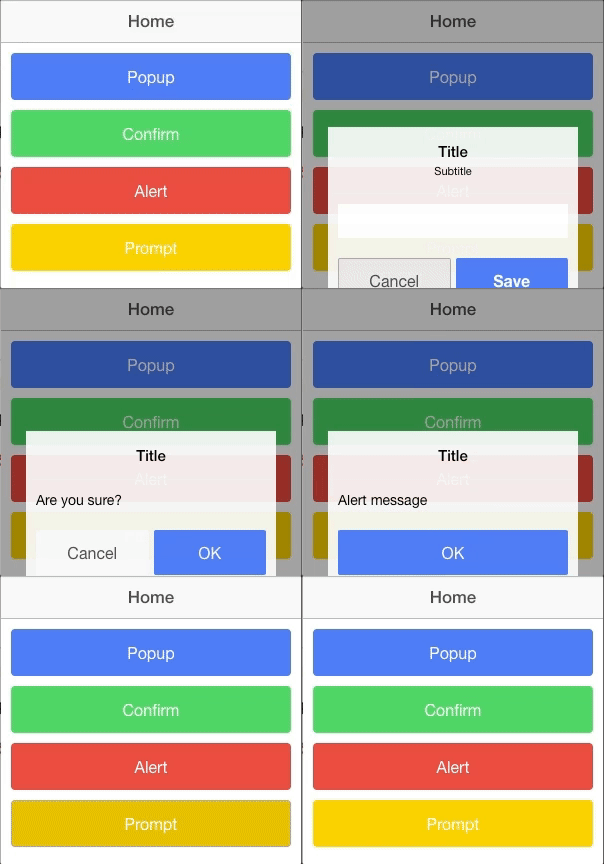
115 Ionic1 Popups


.

115 Ionic1 Popups

Source Codes

<!-- Ionic Single Page App Blank Template -->
<!-- Ref: https://www.tutorialspoint.com/ionic/ionic_js_popup.htm -->
<html>
<head>
<meta charset="utf-8">
<meta  name="viewport" content="initial-scale=1,maximum-scale=1,user-scalable=no,width=device-width">
<title></title>
<!--local lib-->
<!--<script src="lib/ionic/js/ionic.bundle.js"></script>-->
<!--cloud lib-->
<script src="//code.ionicframework.com/1.3.2/js/ionic.bundle.js"></script>
<!-- cordova script (this will be a 404 during development) -->
<!--<script src="cordova.js"></script> -->
<!-- IF using Sass (run gulp sass first), then uncomment below and remove the CSS includes above-->
<!--<link href="css/ionic.app.css" rel="stylesheet">-->
<!--local lib-->
<!--<link href="lib/ionic/css/ionic.css" rel="stylesheet">-->
<!--cloud lib-->
<link href="//code.ionicframework.com/1.3.2/css/ionic.css" rel="stylesheet">
<!--ionic custom styling-->
<style>
 .platform-ios .manual-ios-statusbar-padding{padding-top:20px}.manual-remove-top-padding{padding-top:0}.manual-remove-top-padding .scroll{padding-top:0!important}.list.card.manual-card-fullwidth,ion-list.manual-list-fullwidth div.list{margin-left:-10px;margin-right:-10px}.list.card.manual-card-fullwidth>.item,ion-list.manual-list-fullwidth div.list>.item{border-radius:0;border-left:0;border-right:0}.show-list-numbers-and-dots ul{list-style-type:disc;padding-left:40px}.show-list-numbers-and-dots ol{list-style-type:decimal;padding-left:40px}
</style>
</head>
<body ng-app="app" animation="slide-left-right-ios7" >
 <div>
   <div>
     <ion-nav-bar class="bar-stable">
       <ion-nav-back-button></ion-nav-back-button>
     </ion-nav-bar>
     <ion-nav-view></ion-nav-view>
   </div>
 </div>
 <script id="home.html" type="text/ng-template">
   <ion-view title="Home" id="page1">
     <ion-content padding="true" class="has-header">
       <button class="button button-positive button-block" ng-click="showPopup()">Popup</button>
       <button class="button button-balanced button-block" ng-click="showConfirm()">Confirm</button>
       <button class="button button-assertive button-block" ng-click="showAlert()">Alert</button>
       <button class="button button-energized button-block" ng-click="showPrompt()">Prompt</button>  
     </ion-content>
   </ion-view>
 </script>
 <script>
/*create js object app, bind to html app, use ionic framework*/  
var app=angular.module('app',['ionic']);
/******************************/
/*define CONTROLLERS & CONFIGS*/
/******************************/    
/*define app.controller methods*/  
app.controller('homeCtrl',function($scope,$ionicPopup){

/*showPromptPopup*/
  // When button is clicked, the popup will be shown...
  $scope.showPopup = function() {
     $scope.data = {}
 
     // Custom popup
     var myPopup = $ionicPopup.show({
        template: '<input type = "text" ng-model = "data.model">',
        title: 'Title',
        subTitle: 'Subtitle',
        scope: $scope,
                       
        buttons: [
           { text: 'Cancel' }, {
              text: '<b>Save</b>',
              type: 'button-positive',
              onTap: function(e) {
                                               
                 if (!$scope.data.model) {
                    //don't allow the user to close unless he enters model...
                    e.preventDefault();
                 } else {
                    return $scope.data.model;
                 }
              }
           }
        ]
     });

     myPopup.then(function(res) {
        console.log('Tapped!', res);
     });  
  };

/*show confirm */

    // When button is clicked, the popup will be shown...
  $scope.showConfirm = function() {
       
     var confirmPopup = $ionicPopup.confirm({
        title: 'Title',
        template: 'Are you sure?'
     });

     confirmPopup.then(function(res) {
        if(res) {
           console.log('Sure!');
        } else {
           console.log('Not sure!');
        }
     });
               
  };

/*show alert*/
  $scope.showAlert = function() {
       
     var alertPopup = $ionicPopup.alert({
        title: 'Title',
        template: 'Alert message'
     });

     alertPopup.then(function(res) {
        // Custom functionality....
     });
  };
/*show prompt*/
  $scope.showPrompt = function() {
       
     var promptPopup = $ionicPopup.prompt({
        title: 'Title',
        template: 'Template text',
        inputType: 'text',
        inputPlaceholder: 'Placeholder'
     });
     
     promptPopup.then(function(res) {
        console.log(res);
     });
               
  };
});
/*define app.config method*/  
app.config(function($stateProvider,$urlRouterProvider){
 $stateProvider.state('home',{url:'/page1',templateUrl:'home.html',controller:'homeCtrl'});
 $urlRouterProvider.otherwise('/page1')
});
/************************/
/*define SYSTEM SETTINGS*/
/************************/
app.config(function($ionicConfigProvider, $sceDelegateProvider){
 $sceDelegateProvider.resourceUrlWhitelist([ 'self','*://www.youtube.com/**', '*://player.vimeo.com/video/**']);
})
app.run(function($ionicPlatform) {
 $ionicPlatform.ready(function() {
   // Hide the accessory bar by default (remove this to show the accessory bar above the keyboard
   // for form inputs)
   if (window.cordova && window.cordova.plugins && window.cordova.plugins.Keyboard) {
     cordova.plugins.Keyboard.hideKeyboardAccessoryBar(true);
     cordova.plugins.Keyboard.disableScroll(true);
   }
   if (window.StatusBar) {
     // org.apache.cordova.statusbar required
     StatusBar.styleDefault();
   }
 });
});

/*
 This directive is used to disable the "drag to open" functionality of the Side-Menu
 when you are dragging a Slider component.
*/
app.directive('disableSideMenuDrag', ['$ionicSideMenuDelegate', '$rootScope', function($ionicSideMenuDelegate, $rootScope) {
   return {
       restrict: "A",
       controller: ['$scope', '$element', '$attrs', function ($scope, $element, $attrs) {

           function stopDrag(){
             $ionicSideMenuDelegate.canDragContent(false);
           }

           function allowDrag(){
             $ionicSideMenuDelegate.canDragContent(true);
           }

           $rootScope.$on('$ionicSlides.slideChangeEnd', allowDrag);
           $element.on('touchstart', stopDrag);
           $element.on('touchend', allowDrag);
           $element.on('mousedown', stopDrag);
           $element.on('mouseup', allowDrag);

       }]
   };
}]);

/*
 This directive is used to open regular and dynamic href links inside of inappbrowser.
*/
app.directive('hrefInappbrowser', function() {
 return {
   restrict: 'A',
   replace: false,
   transclude: false,
   link: function(scope, element, attrs) {
     var href = attrs['hrefInappbrowser'];

     attrs.$observe('hrefInappbrowser', function(val){
       href = val;
     });
   
     element.bind('click', function (event) {

       window.open(href, '_system', 'location=yes');

       event.preventDefault();
       event.stopPropagation();

     });
   }
 };
});
 </script>
 </body>
</html>

Reference

Preview


Live Demo

.

114 Ionic1 IonicLoading


.
ionicv1 tutorial

114 Ionic1 IonicLoading

Note

$ionicLoading

An overlay that can be used to indicate activity while blocking user interaction.

Codes

<html>
<head>
<meta charset="utf-8">
<meta  name="viewport" content="initial-scale=1,maximum-scale=1,user-scalable=no,width=device-width">
<title></title>
<!--local lib-->
<!--<script src="lib/ionic/js/ionic.bundle.js"></script>-->
<!--cloud lib-->
<script src="http://code.ionicframework.com/1.3.2/js/ionic.bundle.js"></script>
<!-- cordova script (this will be a 404 during development) -->
<!--<script src="cordova.js"></script> -->
<!-- IF using Sass (run gulp sass first), then uncomment below and remove the CSS includes above-->
<!--<link href="css/ionic.app.css" rel="stylesheet">-->
<!--local lib-->
<!--<link href="lib/ionic/css/ionic.css" rel="stylesheet">-->
<!--cloud lib-->
<link href="http://code.ionicframework.com/1.3.2/css/ionic.css" rel="stylesheet">
<!--ionic custom styling-->
<style>
  .platform-ios .manual-ios-statusbar-padding{padding-top:20px}.manual-remove-top-padding{padding-top:0}.manual-remove-top-padding .scroll{padding-top:0!important}.list.card.manual-card-fullwidth,ion-list.manual-list-fullwidth div.list{margin-left:-10px;margin-right:-10px}.list.card.manual-card-fullwidth>.item,ion-list.manual-list-fullwidth div.list>.item{border-radius:0;border-left:0;border-right:0}.show-list-numbers-and-dots ul{list-style-type:disc;padding-left:40px}.show-list-numbers-and-dots ol{list-style-type:decimal;padding-left:40px}
</style>
</head>  
<body ng-app="app" animation="slide-left-right-ios7" >
  <div>
    <div>
      <ion-nav-bar class="bar-stable">
        <ion-nav-back-button></ion-nav-back-button>
      </ion-nav-bar>
      <ion-nav-view></ion-nav-view>
    </div>
  </div>
  <script id="home.html" type="text/ng-template">
    <ion-view title="Home" id="page1">
      <ion-content padding="true" class="has-header">
          <ion-list>
            <ion-item ng-repeat="stooge in stooges" href="#">{{stooge.name}}</ion-item>
          </ion-list>
      </ion-content>
    </ion-view>
  </script>
  <script>
/*create js object app, bind to html app, use ionic framework*/    
var app=angular.module('app',['ionic']);
/******************************/
/*define CONTROLLERS & CONFIGS*/
/******************************/      
/*define app.controller methods*/    
app.controller('homeCtrl',function($scope, $timeout, $ionicLoading){
  // Setup the loader
  $ionicLoading.show({
    content: 'Loading',
    animation: 'fade-in',
    showBackdrop: true,
    maxWidth: 200,
    showDelay: 0
  });

  // Set a timeout to clear loader, however you would actually call the $ionicLoading.hide(); method whenever everything is ready or loaded.
  $timeout(function () {
    $ionicLoading.hide();
    $scope.stooges = [{name: 'Moe'}, {name: 'Larry'}, {name: 'Curly'}];
  }, 2000);  
});
/*define app.config method*/    
app.config(function($stateProvider,$urlRouterProvider){
  $stateProvider.state('home',{url:'/page1',templateUrl:'home.html',controller:'homeCtrl'});
  $urlRouterProvider.otherwise('/page1')
});
/************************/
/*define SYSTEM SETTINGS*/
/************************/
app.config(function($ionicConfigProvider, $sceDelegateProvider){
  $sceDelegateProvider.resourceUrlWhitelist([ 'self','*://www.youtube.com/**', '*://player.vimeo.com/video/**']);
})
app.run(function($ionicPlatform) {
  $ionicPlatform.ready(function() {
    // Hide the accessory bar by default (remove this to show the accessory bar above the keyboard
    // for form inputs)
    if (window.cordova && window.cordova.plugins && window.cordova.plugins.Keyboard) {
      cordova.plugins.Keyboard.hideKeyboardAccessoryBar(true);
      cordova.plugins.Keyboard.disableScroll(true);
    }
    if (window.StatusBar) {
      // org.apache.cordova.statusbar required
      StatusBar.styleDefault();
    }
  });
});
/*
  This directive is used to disable the "drag to open" functionality of the Side-Menu
  when you are dragging a Slider component.
*/
app.directive('disableSideMenuDrag', ['$ionicSideMenuDelegate', '$rootScope', function($ionicSideMenuDelegate, $rootScope) {
    return {
        restrict: "A",  
        controller: ['$scope', '$element', '$attrs', function ($scope, $element, $attrs) {
            function stopDrag(){
              $ionicSideMenuDelegate.canDragContent(false);
            }
            function allowDrag(){
              $ionicSideMenuDelegate.canDragContent(true);
            }
            $rootScope.$on('$ionicSlides.slideChangeEnd', allowDrag);
            $element.on('touchstart', stopDrag);
            $element.on('touchend', allowDrag);
            $element.on('mousedown', stopDrag);
            $element.on('mouseup', allowDrag);
        }]
    };
}]);
/*
  This directive is used to open regular and dynamic href links inside of inappbrowser.
*/
app.directive('hrefInappbrowser', function() {
  return {
    restrict: 'A',
    replace: false,
    transclude: false,
    link: function(scope, element, attrs) {
      var href = attrs['hrefInappbrowser'];
      attrs.$observe('hrefInappbrowser', function(val){
        href = val;
      });
     
      element.bind('click', function (event) {
        window.open(href, '_system', 'location=yes');
        event.preventDefault();
        event.stopPropagation();
      });
    }
  };
});
  </script>
  </body>
</html>

Reference

Demo


.

See the Pen 309 IonicV1 IonicLoading by notarazi (@notarazi) on CodePen.


.

112 Ionic1 Keyboard


.

112 Ionic1 Keyboard

Keyboard


On both Android and iOS, Ionic will attempt to prevent the keyboard from obscuring inputs and focusable elements when it appears by scrolling them into view. In order for this to work, any focusable elements must be within a Scroll View or a directive such as Content that has a Scroll View.

It will also attempt to prevent the native overflow scrolling on focus, which can cause layout issues such as pushing headers up and out of view.

The keyboard fixes work best in conjunction with the Ionic Keyboard Plugin, although it will perform reasonably well without. However, if you are using Cordova there is no reason not to use the plugin.

Hide when keyboard shows
To hide an element when the keyboard is open, add the class hide-on-keyboard-open.
<div class="hide-on-keyboard-open">
 <div id="google-map"></div>
</div>


Note: For performance reasons, elements will not be hidden for 400ms after the start of the native.keyboardshow event from the Ionic Keyboard plugin. If you would like them to disappear immediately, you could do something like:
  window.addEventListener('native.keyboardshow', function(){
   document.body.classList.add('keyboard-open');
 });


This adds the same keyboard-open class that is normally added by Ionic 400ms after the keyboard opens. However, bear in mind that adding this class to the body immediately may cause jank in any animations on Android that occur when the keyboard opens (for example, scrolling any obscured inputs into view).

Plugin Usage
Information on using the plugin can be found at https://github.com/ionic-team/ionic-plugins-keyboard .

Reference


.

111 Ionic1 Header and Footer


.

111 Ionic1 Header and Footer

Ion-header-bar

Adds a fixed header bar above some content.
Can also be a subheader (lower down) if the ‘bar-subheader’ class is applied.
<ion-header-bar align-title="left" class="bar-positive">
 <div class="buttons">
   <button class="button" ng-click="doSomething()">Left Button</button>
 </div>
 <h1 class="title">Title!</h1>
 <div class="buttons">
   <button class="button">Right Button</button>
 </div>
</ion-header-bar>
<ion-content class="has-header">
 Some content!
</ion-content>

Sub Header

A secondary header bar can be placed below the original header bar. There are quite a few more ways to customize Headers.
<div class="bar bar-header">
 <h1 class="title">Header</h1>
</div>
<div class="bar bar-subheader">
 <h2 class="title">Sub Header</h2>
</div>
Also, remember to include the has-subheader CSS class to your ion-content directive.

Ion-footer-bar

Adds a fixed footer bar below some content.
Can also be a subfooter (higher up) if the ‘bar-subfooter’ class is applied.
<ion-content class="has-footer">
 Some content!
</ion-content>
<ion-footer-bar align-title="left" class="bar-assertive">
 <div class="buttons">
   <button class="button">Left Button</button>
 </div>
 <h1 class="title">Title!</h1>
 <div class="buttons" ng-click="doSomething()">
   <button class="button">Right Button</button>
 </div>
</ion-footer-bar>
Ref:

.

110 Ionic1 Gestures and Events


.

110 Ionic1 Gestures and Events


Notes

Source Codes

on-hold

Touch stays at the same location for 500ms. Similar to long touch events available for AngularJS and jQuery.
<button on-hold="onHold()" class="button">Test</button>
on-tap

Quick touch at a location. If the duration of the touch goes longer than 250ms it is no longer a tap gesture.
<button on-tap="onTap()" class="button">Test</button>
on-double-tap

Double tap touch at a location.
<button on-double-tap="onDoubleTap()" class="button">Test</button>
on-touch

Called immediately when the user first begins a touch. This gesture does not wait for a touchend/mouseup.
<button on-touch="onTouch()" class="button">Test</button>
on-release

Called when the user ends a touch.
<button on-release="onRelease()" class="button">Test</button>
on-drag

Move with one touch around on the page. Blocking the scrolling when moving left and right is a good practice. When all the drag events are blocking you disable scrolling on that area.

<button on-drag="onDrag()" class="button">Test</button>
on-drag-up

Called when the element is dragged up.
<button on-drag-up="onDragUp()" class="button">Test</button>
on-drag-right

Called when the element is dragged to the right.
<button on-drag-right="onDragRight()" class="button">Test</button>
on-drag-down

Called when the element is dragged down.

<button on-drag-down="onDragDown()" class="button">Test</button>
on-drag-left

Called when the element is dragged to the left.
<button on-drag-left="onDragLeft()" class="button">Test</button>
on-swipe

Called when a moving touch has a high velocity in any direction.

<button on-swipe="onSwipe()" class="button">Test</button>
on-swipe-up

Called when a moving touch has a high velocity moving up.
<button on-swipe-up="onSwipeUp()" class="button">Test</button>
on-swipe-right

Called when a moving touch has a high velocity moving to the right.
<button on-swipe-right="onSwipeRight()" class="button">Test</button>
on-swipe-down

Called when a moving touch has a high velocity moving down.
<button on-swipe-down="onSwipeDown()" class="button">Test</button>
on-swipe-left

Called when a moving touch has a high velocity moving to the left.
<button on-swipe-left="onSwipeLeft()" class="button">Test</button>
$ionicGesture

An angular service exposing ionic ionic.EventController’s gestures.
on(eventType, callback, $element, options)
Add an event listener for a gesture on an element. See ionic.EventController.

off(gesture, eventType, callback)
Remove an event listener for a gesture on an element. See ionic.EventController.


Reference

http://ionicframework.com/docs/v1/api/service/$ionicGesture/
.