Learn the powerful enterprise adaptable database:

Getting Started With ADABAS & Natural

Showing posts with label JavaScript. Show all posts

Saturday, February 3, 2018

What is Tilde in Programming?


.
This symbol (in English) informally means "approximately", "about", or "around", such as "~30 minutes before", meaning "approximately 30 minutes before".

It can mean "similar to", including "of the same order of magnitude as", such as: "x ~ y" meaning that x and y are of the same order of magnitude.

In Computer Programming such as C, Java and JavaScript,  Tilde symbol (~) represents an operator.

For example, in JavaScript, it represents a NOT Bitwise Operator.

Read the following texts for further explanation.

.
The following table summarizes JavaScript's bitwise operators:
OperatorUsageDescription
Bitwise ANDa & bReturns a 1 in each bit position for which the corresponding bits of both operands are 1's.
Bitwise ORa | bReturns a 1 in each bit position for which the corresponding bits of either or both operands are 1's.
Bitwise XORa ^ bReturns a 1 in each bit position for which the corresponding bits of either but not both operands are 1's.
Bitwise NOT~ aInverts the bits of its operand.
Left shifta << bShifts a in binary representation b (< 32) bits to the left, shifting in 0's from the right.
Sign-propagating right shifta >> bShifts a in binary representation b (< 32) bits to the right, discarding bits shifted off.
Zero-fill right shifta >>> bShifts a in binary representation b (< 32) bits to the right, discarding bits shifted off, and shifting in 0's from the left.
.

Source: https://developer.mozilla.org/en-US/docs/Web/JavaScript/Reference/Operators/Bitwise_Operators

Thursday, August 3, 2017

TypeScript Online Editor


.
You can practice TypeScript using http://www.typescriptlang.org/play/.

Or, you can try developing TypeScript application using https://codepen.io.


Wednesday, August 2, 2017

What is TypeScript?


.
The following article provides the explanation.
.

What is TypeScript?

By definition, “TypeScript is JavaScript for application-scale development.”
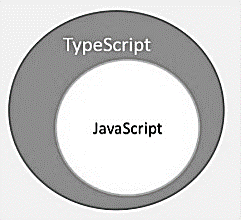
TypeScript is a strongly typed, object oriented, compiled language. It was designed by Anders Hejlsberg (designer of C#) at Microsoft. TypeScript is both a language and a set of tools. TypeScript is a typed superset of JavaScript compiled to JavaScript. In other words, TypeScript is JavaScript plus some additional features.
TypeScript Figure

Features of TypeScript

TypeScript is just JavaScript. TypeScript starts with JavaScript and ends with JavaScript. Typescript adopts the basic building blocks of your program from JavaScript. Hence, you only need to know JavaScript to use TypeScript. All TypeScript code is converted into its JavaScript equivalent for the purpose of execution.
TypeScript supports other JS libraries. Compiled TypeScript can be consumed from any JavaScript code. TypeScript-generated JavaScript can reuse all of the existing JavaScript frameworks, tools, and libraries.
JavaScript is TypeScript. This means that any valid .js file can be renamed to .ts and compiled with other TypeScript files.
TypeScript is portable. TypeScript is portable across browsers, devices, and operating systems. It can run on any environment that JavaScript runs on. Unlike its counterparts, TypeScript doesn’t need a dedicated VM or a specific runtime environment to execute.

TypeScript and ECMAScript

The ECMAScript specification is a standardized specification of a scripting language. There are six editions of ECMA-262 published. Version 6 of the standard is codenamed "Harmony". TypeScript is aligned with the ECMAScript6 specification.
TypeScript and ECMAScript
TypeScript adopts its basic language features from the ECMAScript5 specification, i.e., the official specification for JavaScript. TypeScript language features like Modules and class-based orientation are in line with the EcmaScript 6 specification. Additionally, TypeScript also embraces features like generics and type annotations that aren’t a part of the EcmaScript6 specification.

Why Use TypeScript?

TypeScript is superior to its other counterparts like CoffeeScript and Dart programming languages in a way that TypeScript is extended JavaScript. In contrast, languages like Dart, CoffeeScript are new languages in themselves and require language-specific execution environment.
The benefits of TypeScript include −
  • Compilation − JavaScript is an interpreted language. Hence, it needs to be run to test that it is valid. It means you write all the codes just to find no output, in case there is an error. Hence, you have to spend hours trying to find bugs in the code. The TypeScript transpiler provides the error-checking feature. TypeScript will compile the code and generate compilation errors, if it finds some sort of syntax errors. This helps to highlight errors before the script is run.
  • Strong Static Typing − JavaScript is not strongly typed. TypeScript comes with an optional static typing and type inference system through the TLS (TypeScript Language Service). The type of a variable, declared with no type, may be inferred by the TLS based on its value.
  • TypeScript supports type definitions for existing JavaScript libraries. TypeScript Definition file (with .d.ts extension) provides definition for external JavaScript libraries. Hence, TypeScript code can contain these libraries.
  • TypeScript supports Object Oriented Programming concepts like classes, interfaces, inheritance, etc.

Components of TypeScript

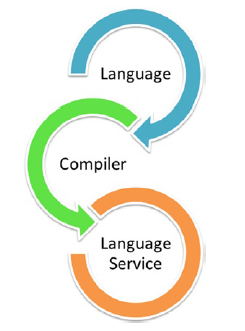
At its heart, TypeScript has the following three components −
  • Language − It comprises of the syntax, keywords, and type annotations.
  • The TypeScript Compiler − The TypeScript compiler (tsc) converts the instructions written in TypeScript to its JavaScript equivalent.
  • The TypeScript Language Service − The "Language Service" exposes an additional layer around the core compiler pipeline that are editor-like applications. The language service supports the common set of a typical editor operations like statement completions, signature help, code formatting and outlining, colorization, etc.
TypeScript Components

Declaration Files

When a TypeScript script gets compiled, there is an option to generate a declaration file (with the extension .d.ts) that functions as an interface to the components in the compiled JavaScript. The concept of declaration files is analogous to the concept of header files found in C/C++. The declaration files (files with .d.ts extension) provide intellisense for types, function calls, and variable support for JavaScript libraries like jQuery, MooTools, etc.

.

Monday, April 24, 2017

Apps Script and JSON Web Token


Introduction

This tutorial demonstrates the use of JSON Web Token in Apps Script.

Objective

1. Add JWT Library.
2. Encode token.

3. Decode token.


1.Add JWT Library

We can add JWT in two ways:

1. Link to the external site.

eval(UrlFetchApp.fetch('https://kjur.github.io/jsrsasign/jsrsasign-latest-all-min.js').getContentText());


2. Get the codes from the source and paste into code file.

You may get the following error during run time:

navigator is not defined

window is not defined

Solution: Add the following codes to declare them
var navigator = {};  
var window = {};  

2.Sample codes


var navigator = {};  
var window = {};  
//eval(UrlFetchApp.fetch('https://kjur.github.io/jsrsasign/jsrsasign-latest-all-min.js').getContentText());
/* sample output:
Signing JSON Web Token:eyJhbGciOiJIUzI1NiJ9.eyJuYW1lIjogInVzZXIiLCJnbWFpbCI6InVzZXJAZ21haWwuY29tIn0.iM_n__aH7Bl1ZfJirgTckU51x1xbRi6cw8lJMK4G5K8
Validate Signature:true
*** Header ***
Parsing Header:{"alg":"HS256"}
*** Payload ***
Parsing Payload:{"name":"user","gmail":"user@gmail.com"}
*/


function myfunction(){

  // JWS signing 
sJWT = KJUR.jws.JWS.sign(null, '{"alg":"HS256"}', '{"name": "user","gmail":"user@gmail.com"}', {"utf8": "password"});

Logger.log("Signing JSON Web Token:"+sJWT);

// JWT validation
isValid = KJUR.jws.JWS.verifyJWT(sJWT, {"utf8": "password"}, {alg: ["HS256"]});
Logger.log("Validate Signature:"+isValid);

var headerObj = KJUR.jws.JWS.readSafeJSONString(b64utoutf8(sJWT.split(".")[0]));
Logger.log("*** Header ***");
Logger.log("Parsing Header:"+JSON.stringify(headerObj));

var payloadObj = KJUR.jws.JWS.readSafeJSONString(b64utoutf8(sJWT.split(".")[1]));
Logger.log("*** Payload ***");
Logger.log("Parsing Payload:"+JSON.stringify(payloadObj));

}

3.References

1. https://www.jonathan-petitcolas.com/2014/11/27/creating-json-web-token-in-javascript.html
2. https://codepen.io/jpetitcolas/pen/zxGxKN
3. https://jwt.io/
4. https://community.servicenow.com/thread/208145
5. https://kjur.github.io/jsrsasign/api/symbols/KJUR.jws.JWS.html
6. https://community.apigee.com/questions/28794/best-practices-for-passing-an-access-token-without.html
7. https://auth0.com/blog/angularjs-authentication-with-cookies-vs-token/
8. https://stormpath.com/blog/build-secure-user-interfaces-using-jwts
9. https://developers.facebook.com/docs/facebook-login/manually-build-a-login-flow#checktoken
10. https://stormpath.com/blog/where-to-store-your-jwts-cookies-vs-html5-web-storage
11. http://googleappscripting.com/doget-dopost-tutorial-examples/


201704, 20170423, JWT, FIREBASE

Saturday, April 22, 2017

102 Apps Script: ObjDb Sheet Register Email PinCode


.
102 Apps Script: ObjDb Sheet Register Email PinCode


Introduction

This tutorial demonstrates the user registration and verification via email account.
Successful registration and verification process will return the registered username.
This tutorial uses ObjDb Library to interact with Google Spreadsheet.


Objective


1. Register a new user. Generate and send the PinCode to user email.
2. The user receives the PinCode and click the link to verify the code.
3. Successful verification process returns the correct username.
We use additional javascript utility functions to encode/decode parameter values:
1. baseToBase() - to encode/decode number to/from one base to another.
2. Base64 - to encode/decode string to/from base 64 values.
You can try explore many other encoding techniques.

1. Create Script.

Script name=_102-reguser-pincode.
Copy and paste the following codes:
function setupApp(){
  /*script id*/
  var SCPID = ScriptApp.getScriptId();  
  var file = DriveApp.getFileById(SCPID);
  var folders = file.getParents();
  while (folders.hasNext()){
    FOLID=folders.next().getId();
  }  

  FOLDER = DriveApp.getFolderById(FOLID);
  var d = new Date();  
  var t = d.getTime();

  var NEWSST = SpreadsheetApp.create("_appdata-102-"+t);
  var TEMP = DriveApp.getFileById(NEWSST.getId());
  FOLDER.addFile(TEMP);
  DriveApp.getRootFolder().removeFile(TEMP);  

  var scriptProperties = PropertiesService.getScriptProperties();  
  scriptProperties.setProperties({
    scpid:SCPID,
    folid:FOLID,
    sstid:NEWSST.getId()
  });


  /*record headers*/
  var arrRecordTitles=["admin","user"];
  var arrRecordHeaders=[
  ["tid","timestamp","name","gmail"],
  ["tid","timestamp","name","gmail","pincode"]
    ];
  for (i in arrRecordTitles){
    var Sheet = NEWSST.getSheetByName(arrRecordTitles[i]);
    if (Sheet != null) {
      NEWSST.setActiveSheet(NEWSST.getSheetByName(arrRecordTitles[i]));
      NEWSST.deleteActiveSheet();
    }
    NewSheet = NEWSST.insertSheet();
    NewSheet.setName(arrRecordTitles[i]);
    NewSheet.appendRow(arrRecordHeaders[i]);
    NewSheet.getRange("A2:A").setNumberFormat('@STRING@');    
  }
}
/*https://coderwall.com/p/_g3x9q/how-to-check-if-javascript-object-is-empty*/
function isObjectEmpty(r){for(var n in r)if(r.hasOwnProperty(n))return!1;return!0}
/*http://www.deluge.co/?q=javascript-int-hex-universal-base-converter*/
function baseToBase(fromBase,toBase,value){;if(value=="") value=0;value=parseInt(value,fromBase);return Number(value).toString(toBase).toUpperCase();}
/*http://www.webtoolkit.info/javascript-base64.html#.WapakHcjGL9*/
var Base64={_keyStr:"ABCDEFGHIJKLMNOPQRSTUVWXYZabcdefghijklmnopqrstuvwxyz0123456789+/=",encode:function(input){var output="";var chr1,chr2,chr3,enc1,enc2,enc3,enc4;var i=0;input=Base64._utf8_encode(input);while(i<input.length){chr1=input.charCodeAt(i++);chr2=input.charCodeAt(i++);chr3=input.charCodeAt(i++);enc1=chr1>>2;enc2=((chr1&3)<<4)|(chr2>>4);enc3=((chr2&15)<<2)|(chr3>>6);enc4=chr3&63;if(isNaN(chr2)){enc3=enc4=64;}else if(isNaN(chr3)){enc4=64;} output=output+ this._keyStr.charAt(enc1)+this._keyStr.charAt(enc2)+ this._keyStr.charAt(enc3)+this._keyStr.charAt(enc4);} return output;},decode:function(input){var output="";var chr1,chr2,chr3;var enc1,enc2,enc3,enc4;var i=0;input=input.replace(/[^A-Za-z0-9+/=]/g,"");while(i<input.length){enc1=this._keyStr.indexOf(input.charAt(i++));enc2=this._keyStr.indexOf(input.charAt(i++));enc3=this._keyStr.indexOf(input.charAt(i++));enc4=this._keyStr.indexOf(input.charAt(i++));chr1=(enc1<<2)|(enc2>>4);chr2=((enc2&15)<<4)|(enc3>>2);chr3=((enc3&3)<<6)|enc4;output=output+String.fromCharCode(chr1);if(enc3!=64){output=output+String.fromCharCode(chr2);} if(enc4!=64){output=output+String.fromCharCode(chr3);}} output=Base64._utf8_decode(output);return output;},_utf8_encode:function(string){string=string.replace(/rn/g,"n");var utftext="";for(var n=0;n<string.length;n++){var c=string.charCodeAt(n);if(c<128){utftext+=String.fromCharCode(c);} else if((c>127)&&(c<2048)){utftext+=String.fromCharCode((c>>6)|192);utftext+=String.fromCharCode((c&63)|128);} else{utftext+=String.fromCharCode((c>>12)|224);utftext+=String.fromCharCode(((c>>6)&63)|128);utftext+=String.fromCharCode((c&63)|128);}} return utftext;},_utf8_decode:function(utftext){var string="";var i=0;var c=c1=c2=0;while(i<utftext.length){c=utftext.charCodeAt(i);if(c<128){string+=String.fromCharCode(c);i++;} else if((c>191)&&(c<224)){c2=utftext.charCodeAt(i+1);string+=String.fromCharCode(((c&31)<<6)|(c2&63));i+=2;} else{c2=utftext.charCodeAt(i+1);c3=utftext.charCodeAt(i+2);string+=String.fromCharCode(((c&15)<<12)|((c2&63)<<6)|(c3&63));i+=3;}} return string;}}
function initApp(){
  SCRIPTPROP = PropertiesService.getScriptProperties();  
  if (isObjectEmpty(SCRIPTPROP.getProperties())){
    setupApp();
    SCRIPTPROP = PropertiesService.getScriptProperties();    
  }
  Logger.log(SCRIPTPROP.getProperties());  
  /* projectkey=MJMF2lqsgWV-I-dlyqJN6OrljYCrJdQKl */
  DB1 = objDB.open(SCRIPTPROP.getProperty("sstid"));  

}
/* web request listeners */
function doGet(e) {
  return handleResponse(e);
}
function doPost(e) {
  return handleResponse(e);
}
/* handle action request */
function handleResponse(e) {
  var lock = LockService.getPublicLock();
  lock.waitLock(30000); // wait 30 seconds before conceding defeat.
  try {
    var cmd = e.parameter.cmd;
    var output = [];
    if (cmd == "app") {
      output = taskManager("app", e);
    } else if (cmd == "getuser") {
      output = taskManager("getuser", e);
    } else if (cmd == "reguser") {
      output = taskManager("reguser", e);
    } else if (cmd == "setuser") {
      output = taskManager("setuser", e);
    } else if (cmd == "deluser") {
      output = taskManager("deluser", e);
    } else if (cmd == "chkuser") {
      output = taskManager("chkuser", e);
    }  
    return ContentService.createTextOutput(JSON.stringify({
      "result": "success",
      "data": output
    })).setMimeType(ContentService.MimeType.JSON);
    //return output
  } catch (e) { /*if error return this*/
    return ContentService.createTextOutput(JSON.stringify({
      "result": "error",
      "error": e
    })).setMimeType(ContentService.MimeType.JSON);
  } finally { /*release lock*/
    lock.releaseLock();
  }
}
/*taskManager*/
function taskManager(cmd, e) {
  initApp();
  var output = "";  
  switch (cmd) {  
    case "app":
      /*test with a call to get rows from admin sheet*/
      output=objDB.getRows( DB1, 'admin' );
      return output;
      break;
    case "getuser":
      var tid = e.parameter["tid"] || "";
      if(tid!=""){output=objDB.getRows(DB1,'user',[],{tid:tid});}
      else{output=objDB.getRows( DB1, 'user' );}
      return output;
      break;      
    case "reguser":
      var objRecord={tid:0,timestamp:"",name:"",gmail:"",pincode:""};
      for(var key in objRecord) {objRecord[key]=e.parameter[key];}      
      var d = new Date();
      objRecord.timestamp = d;
      objRecord.tid = d.getTime();
      objRecord.pincode=baseToBase(10,16,objRecord.tid);
      var newrecord=objDB.insertRow( DB1, 'user',objRecord );
      Logger.log(newrecord);
      /* https://developers.google.com/apps-script/reference/mail */
      var link=ScriptApp.getService().getUrl();
      MailApp.sendEmail({
        name: "App Team",
        to: objRecord.gmail,
        subject: "App Registration",
        htmlBody: "Dear " + objRecord.name + ",<br/> " +
        "Your app registration has been successful. <br/> " +
        "Your pincode is... <h1>" + objRecord.pincode +"</h1>"+
        "<a href='" + link + "?cmd=chkuser&uc="+ Base64.encode(objRecord.name) + "&pc="+ objRecord.pincode + "'>" +
        "Click here to test your pincode<br/>" +
        "</a>"+
        "<br/>"+
        "Thank you.<br/>" +
        "<br/>"+        
        "(From App Team)"
      });      
      var g = {parameter:{tid:objRecord.tid}};
      output= taskManager("getuser",g);
      return output;
      break;
     
    case "chkuser":
      var objCheck={uc:"",pc:""};  
      var objRecord={name:"",pincode:""};  
      for(var key in objCheck) {objCheck[key]=e.parameter[key];}            
      if(objCheck.uc!="" && objCheck.pc!=""){
        objRecord.name=Base64.decode(objCheck.uc);
        objRecord.pincode=objCheck.pc;
        output=objDB.getRows(DB1,'user',["name"],objRecord);        
      }      
      return output;
      break;      
    case "setuser":
      var objRecord={tid:0,timestamp:"",name:"",gmail:"",fileid:""};      
      for(var key in objRecord) {objRecord[key]=e.parameter[key];}    
      var d = new Date();  
      objRecord.timestamp = d;
      var newrecord=objDB.updateRow( DB1, 'user',objRecord,{tid:objRecord.tid} );
      Logger.log(newrecord);
      if (newrecord==1){
        var f = {parameter:{tid:objRecord.tid}};
       
        output= taskManager("getuser",f);
      }
      return output;
      break;      
    case "deluser":
      var objRecord={tid:0,timestamp:"",name:"",gmail:""};      
      for(var key in objRecord) {objRecord[key]=e.parameter[key];}          
      var delrecord=objDB.deleteRow(DB1, 'user', {tid:objRecord.tid} );
      Logger.log(delrecord);
      if (delrecord==1) {output= [{tid:0}];}
      else {output= [];}
      return output;
      break;              
  }/*swith*/
}
function test(){
 Logger.log(taskManager("app")) ;
}
function testGetUsers() {
  var e = {parameter: {cmd: "getuser"}};Logger.log(taskManager("getuser",e));
}
function testGetUser() {
  var e = {parameter: {cmd: "getuser",tid:"123"}};Logger.log(taskManager("getuser",e));
}
function testRegUser() {
  var e = {parameter: {cmd: "adduser",name: "aba",gmail: "notarazi.com@gmail.com"}};Logger.log(taskManager("reguser",e));
}
function testSetUser() {
  var e = {parameter: {cmd: "setuser",tid:123,name: "vivi",gmail: "vovoi@gmail.com"}};Logger.log(taskManager("setuser",e));
}
function testDelUser() {
  var e = {parameter: {cmd: "deluser",tid: "789"}};Logger.log(taskManager("deluser",e));
}

2. Test

Publish as Web App.
Run testRegUser()
The script created a new record eg
tid
timestamp
name
gmail
pincode
1504338453958
02/09/2017
aba
notarazi.com@gmail.com
15E418F25C6
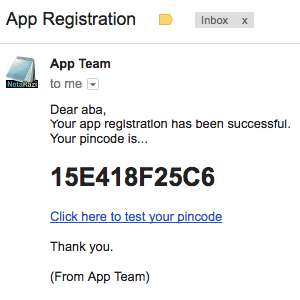
The script sent email to the user eg
The link contains the urlcmdusercode (uc) and pincode(pc) parameters eg
https://script.google.com/macros/s/AKfycbw9oSgyvRmK8mm0Yi48HTNAM9M9-2WnBRftMbd1ZJP2OzV3v_YH/exec?cmd=chkuser&uc=YWJh&pc=15E418F25C6
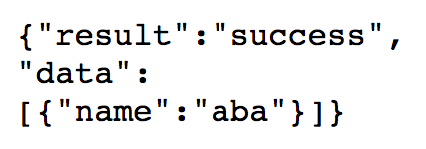
When the user clicked the link, the script returned
In this example, we use pincode instead of password.
The pincode represents the idea of token.
Token can only be retrieved by the owner of the email account.
Token may have expiry date/time, which means the user would have to check the email box again for new pincode in order to use the service.

.